Masking an image using C#
18 September 2018
Categories: Software Development
Posted in: C#, .NET, Image
Here is a C# class that allows you to apply a mask to an existing image.
This class works by covering the main image (image to be masked) with another image (the mask) that has transparent areas.
The transparent pixels in the mask will let us see the intended portion of the underlying image.
In it's simplest usage, simply call our class method MaskImage passing the path to both images (source and mask) and specifying the resulting image size, as follows:
using (var result = (Bitmap)ImageMask.MaskImage(
    Bitmap.FromFile(Server.MapPath("/app_data/logo.png")), // Source image
    Bitmap.FromFile(Server.MapPath("/app_data/mask.png")), // Image mask
    300,  // Width
    300)) // Height
{
    // Send masked image to the browser
    Response.ContentType = "image/png";
    result.Save(Response.OutputStream, ImageFormat.Png);
}
We can also configure the application to cache the mask image in memory by adding these configuration keys:
<appSettings>
    <add key="ImageMask:CacheMask" value ="true" />
    <add key="ImageMask:MaskPath" value ="path_to_mask_image.png" />
</appSettings>
Then calling method MaskImage as follows:
using (var result = (Bitmap)ImageMask.MaskImage(
    Bitmap.FromFile(Server.MapPath("/app_data/logo.png")), // Source image
    300,  // Width
    300)) // Height
{
    // Send masked image to the browser
    Response.ContentType = "image/png";
    result.Save(Response.OutputStream, ImageFormat.Png);
}
Here's the class:
using System;
using System.Configuration;
using System.Drawing;
using System.Drawing.Drawing2D;
using System.Drawing.Imaging;

public static class ImageMask
{
    private static Image maskImage = null;

    public static bool CacheMask { get; private set; } = false;

    static ImageMask()
    {
        var config = ConfigurationManager.AppSettings["ImageMask:CacheMask"];

        if (null != config)
        {
            bool.TryParse(config, out bool cache);
            CacheMask = cache;

            maskImage = Bitmap.FromFile(ConfigurationManager.AppSettings["ImageMask:MaskPath"]);
        }
    }

    public static void SetMask(Image mask)
    {
        maskImage = mask;
    }

    /// <summary>
    /// Apply cached mask to an image.
    /// </summary>
    /// <param name="image"></param>
    /// <param name="width"></param>
    /// <param name="height"></param>
    /// <returns></returns>
    public static Image MaskImage(Image image, int width, int height)
    {
        Image resizedImage = (Bitmap)ResizeImageKeepAspectRatio(image, width, height);

         if (CacheMask && null != maskImage)
         {
             using (var resizedMask = (Bitmap)ResizeImageKeepAspectRatio(maskImage, width, height))
             {
                 using (var g = Graphics.FromImage(resizedImage)) g.DrawImage(resizedMask, 0, 0);
             }
          }

          return resizedImage;
     }

    /// <summary>
    /// Apply a mask to an image.
    /// </summary>
    /// <param name="image"></param>
    /// <param name="mask"></param>
    /// <param name="width"></param>
    /// <param name="height"></param>
    /// <returns></returns>
    public static Image MaskImage(Image image, Image mask, int width, int height)
    {
        Image resizedImage = (Bitmap)ResizeImageKeepAspectRatio(image, width, height);

        using (var resizedMask = (Bitmap)ResizeImageKeepAspectRatio(mask, width, height))
        {
            using (var g = Graphics.FromImage(resizedImage)) g.DrawImage(resizedMask, 0, 0);
        }

        return resizedImage;
    }

    /// <summary>
    /// Resize an image keeping its aspect ratio (cropping may occur).
    /// </summary>
    /// <param name="source"></param>
    /// <param name="width"></param>
    /// <param name="height"></param>
    /// <returns></returns>
    public static Image ResizeImageKeepAspectRatio(Image source, int width, int height)
    {
        Image result = null;

        try
        {
            if (source.Width != width || source.Height != height)
            {
                // Resize image
                float sourceRatio = (float)source.Width / source.Height;

                using (var target = new Bitmap(width, height))
                {
                    using (var g = System.Drawing.Graphics.FromImage(target))
                    {
                        g.CompositingQuality = CompositingQuality.HighQuality;
                        g.InterpolationMode = InterpolationMode.HighQualityBicubic;
                        g.SmoothingMode = SmoothingMode.HighQuality;

                        // Scaling
                        float scaling;
                        float scalingY = (float)source.Height / height;
                        float scalingX = (float)source.Width / width;
                        if (scalingX < scalingY) scaling = scalingX; else scaling = scalingY;

                        int newWidth = (int)(source.Width / scaling);
                        int newHeight = (int)(source.Height / scaling);

                        // Correct float to int rounding
                        if (newWidth < width) newWidth = width;
                        if (newHeight < height) newHeight = height;

                        // See if image needs to be cropped
                        int shiftX = 0;
                        int shiftY = 0;

                        if (newWidth > width)
                        {
                            shiftX = (newWidth - width) / 2;
                        }

                        if (newHeight > height)
                        {
                            shiftY = (newHeight - height) / 2;
                        }

                        // Draw image
                        g.DrawImage(source, -shiftX, -shiftY, newWidth, newHeight);
                    }

                    result = new Bitmap(target);
                }
            }
            else
            {
                // Image size matched the given size
                result = new Bitmap(target);
            }
        }
        catch (Exception)
        {
            result = null;
        }

        return result;
    }
}
Here is a sample web page that uses our ImageMask class:
using System;
using System.Configuration;
using System.Drawing;
using System.Drawing.Drawing2D;
using System.Drawing.Imaging;
using System.Web.UI;

namespace ImageMaskSample
{
    public partial class _GetImage : Page
    {
        protected void Page_Load(object sender, EventArgs e)
        {
            const int width = 250;
            const int height = 250;

            if (Request.Path.EndsWith("/masked"))
            {
                using (var result = (Bitmap)ImageMask.MaskImage(
                    Bitmap.FromFile(Server.MapPath("/app_data/logo.png")),
                    Bitmap.FromFile(Server.MapPath("/app_data/mask.png")),
                    width,
                    height))
                {
                    Response.ContentType = "image/png";
                    result.Save(Response.OutputStream, ImageFormat.Png);
                }
            }
            else
            {
                using (var result = (Bitmap)ImageMask.ResizeImageKeepAspectRatio(
                    Bitmap.FromFile(Server.MapPath("/app_data/logo.png")),
                    width,
                    height))
                {
                    Response.ContentType = "image/png";
                    result.Save(Response.OutputStream, ImageFormat.Png);
                }
            }
        }
    }
}
Producing the following output:
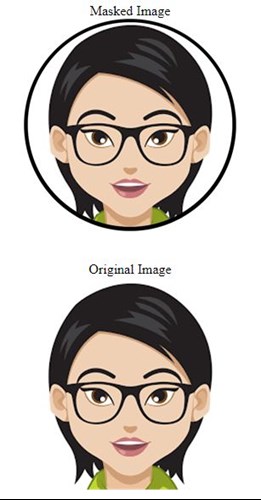
Please note that this class uses a function to resize and crop images maintaining apect ratio which is explained here: Resizing and cropping an image using C#
Happy Coding! ;)